fm1-wheel — hardware manual
Português · English
Tonewheel organ firmware for the M-VAVE FM-1, derived from setBfree, running on fm1-base.
Status: the firmware builds for the FM-1 and passes the build checks, but it has not been tested on hardware yet. The host simulator and the web emulator run the full chain (tone generator, scanner, preamp, reverb and Leslie). This manual describes the intended/implemented behaviour; keyboard and performance details may change after the first device test.
1Install
The firmware is installed over USB-MIDI. Connect the FM-1 with a USB data cable and close any other application using its MIDI ports.
make device          # builds app/build/fm1-wheel.fwsc
make install         # shows the device and asks before writing
You can also use the project's web installer (Chrome/Edge) or run fm1_install.py directly. Installing firmware is at your own risk. Keep the official firmware and the recovery tools (fm1-base/bsp/tools/fm1_rescue.py, FM-1-transporter) at hand.
If the install is interrupted, the FM-1 stays in update mode and the same command finishes the write. To go back to the official firmware, use M-VAVE's updater or the web installer.
2Power on and play
The FM-1 has 27 keys (F3–G5), 7 encoders, 14 buttons, a MASTER pot and a 240×240 screen.
- The keys play the upper manual by default.
OCT-/OCT+transpose the built-in keyboard by up to ±2 octaves. External MIDI is not transposed by these buttons.- The MASTER pot controls the output level.
- An external MIDI controller (USB or TRS) can play any manual; see section 5.
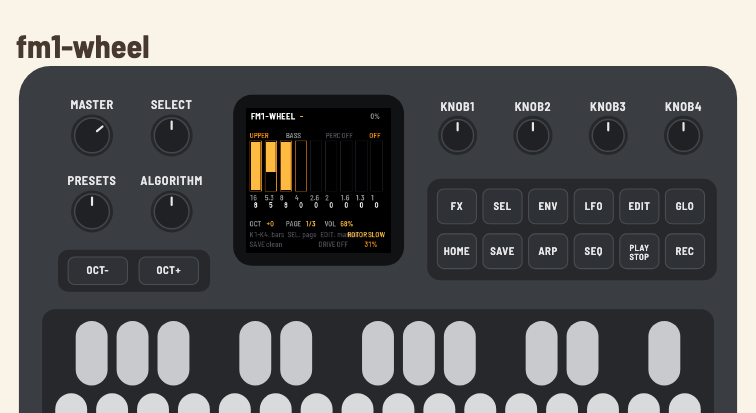
The screen shows:
- header: name, the note that is sounding, and CPU load;
- body: selected manual, registration, percussion, vibrato and the nine drawbar columns with the 16', 5⅓', 8', 4', 2⅔', 2', 1⅗', 1⅓', 1' footages;
- footer: octave, page, volume, rotor, SAVE state, drive and reverb.
3Buttons and encoders
Encoders
| Encoder | Function |
|---|---|
SELECT | edit page: 0 = bars 0–3, 1 = bars 4–7, 2 = bar 8 + percussion |
ALGO | manual being edited: UPPER, LOWER, PEDAL |
PRESET | eight factory registrations; applies to the selected manual |
K1–K4 | edit the four bars of the current page |
On page 2, K1 edits the 1' bar and K2–K4 control percussion (on/off), harmonic (2nd/3rd) and decay (fast/slow).
Buttons
| Button | Function |
|---|---|
FX | drive on/off (preamp/overdrive) |
SEL | next drawbar page |
ENV | percussion on/off |
LFO | vibrato/chorus cycle: OFF → V1 → C1 → V2 → C2 → V3 → C3 |
EDIT | next manual: UPPER → LOWER → PEDAL |
GLO | drawbar-key mode (section 4); its LED is lit while the mode is on |
HOME | back to registration 0 (3BAR) |
SAVE | write the settings to flash |
ARP | percussion 2nd/3rd harmonic |
SEQ | reverb cycle: OFF → 30% → 60% → 100% |
PLAY | rotor: STOP → SLOW → FAST |
REC | reserved (no function in this version) |
OCT- / OCT+ | transpose the built-in keyboard (−2..+2 octaves) |
MASTER | output volume |
The labels printed on the FM-1 are the stock ones; the screen shows the real function of each control.
Factory registrations
| # | Name | Bars |
|---|---|---|
| 0 | 3BAR | 888000000 |
| 1 | BLUES | 888800000 |
| 2 | ROCK | 888000008 |
| 3 | TOPS | 800000888 |
| 4 | FLUTE | 008000000 |
| 5 | FULL | 888888888 |
| 6 | BASS | 858000000 |
| 7 | STRNG | 006876540 |
The registration is applied to the selected manual (ALGO/EDIT).
4Drawbar-key mode (the keyboard as a controller)
GLO turns on/off the mode in which the 27 keys stop playing and edit the drawbars of the selected manual. It is the equivalent of the programming mode on older clonewheel organs.
- Mode on: the built-in keys do not play; each press pushes or pulls a drawbar by one position. External MIDI keeps playing — you can play from a controller and use the FM-1 keyboard to edit the registration.
- Mode off: the keys play normally again.
- The mode is not saved: it starts off at the next boot.
- Drawbar changes mark
SAVE; pressSAVEto store them.
Key map
Each pair flat (black key) / natural (white key) controls one drawbar:
| Pair | Drawbar | Action |
|---|---|---|
| F#3 / G3 | 16' | F# push, G pull |
| G#3 / A3 | 5⅓' | G# push, A pull |
| A#3 / B3 | 8' | A# push, B pull |
| C#4 / D4 | 4' | C# push, D pull |
| D#4 / E4 | 2⅔' | D# push, E pull |
| F#4 / G4 | 2' | F# push, G pull |
| G#4 / A4 | 1⅗' | G# push, A pull |
| A#4 / B4 | 1⅓' | A# push, B pull |
| C#5 / D5 | 1' | C# push, D pull |
- F3, C4, F4 and C5 are ignored.
- D#5, E5, F5, F#5 and G5 are free (no function in this version).
- In drawbar mode all 18 control keys light equally; the ignored/free keys stay dark. The key color (black = push, white = pull) shows the direction.
- The bar grows from top to bottom: 0 = fully pushed in, 8 = fully pulled out (maximum volume).
- Each press changes one step (0..8). The value appears in the corresponding column on the screen; at 0 or 8 the key does not go past the limit.
- The edited manual is the one shown at the top of the screen (
UPPER/LOWER/PEDAL); useEDITor theALGOencoder to change it.
To play from the built-in keyboard again, press GLO again. If a key is held while switching, it is released and only sounds again after being released and pressed again.
5MIDI
The FM-1 has USB-MIDI (in/out) and a TRS-MIDI input; there is no DIN output.
| Channel | Manual |
|---|---|
| 1 | upper |
| 2 | lower |
| 3 | pedal |
Control Changes
| CC | Function |
|---|---|
| 1 / 11 | swell (volume) |
| 70–78 | upper drawbars: 16', 5⅓', 8', 4', 2⅔', 2', 1⅗', 1⅓', 1' (0 = maximum, 127 = minimum) |
| 80 | percussion on/off (≥64 on) |
| 81 | decay fast/slow (≥64 fast) |
| 82 | percussion 2nd/3rd (≥64 2nd) |
| 64 | rotor slow/fast (≥64 toggles) |
| 65 | drive on/off (≥64 on) |
| 92 | vibrato: 0..127 → OFF/V1/C1/V2/C2/V3/C3 |
| 93 | drive character |
| 95 | vibrato routing: 0 off, 32 lower, 64 upper, 96 both |
Program Change 0–7 selects one of the eight registrations.
The drawbar map is setBfree's (inverted: 0 = maximum). An external drawbar controller works without extra configuration, including in drawbar-key mode.
6What is saved
SAVE writes to flash:
- the octave;
- the swell;
- all 27 drawbars (upper/lower/pedal);
- percussion (on/off, 2nd/3rd, fast/slow);
- the selected registration;
- vibrato (mode);
- drive and character;
- reverb;
- rotor (stop/slow/fast).
Not saved: drawbar-key mode, the edit page and the selected manual (they return to their defaults at boot).
7Troubleshooting
| Symptom | What to check |
|---|---|
| No sound | MASTER, audio cable, PLAY/rotor, amplifier volume; in drawbar mode the keys do not play (press GLO) |
| Keys do not play | drawbar-key mode is on (GLO lit) |
| Stuck note | release and press the key again; if it persists, power-cycle the FM-1 |
| External MIDI does not play | channel 1/2/3, USB data cable, another app using the port |
| Installer cannot find the FM-1 | USB data cable, close DAWs/MIDI apps; check fm1_install.py --info |
| Install interrupted | reconnect and run make install again; the FM-1 stays in update mode |
| Distorted sound | lower MASTER, drive or the registration (FULL); the app's limiter acts on peaks |
8Development
make build-host      # host simulator
make test-host       # app tests (keys, drawbars, MIDI, persistence)
make web             # browser emulator (Emscripten)
make serve-web       # http://localhost:8790/
make compare         # A/B against setBfree
make device          # firmware for the FM-1
make install         # writes it to the connected FM-1
The web emulator runs the same C code as the firmware; use Cmd+Shift+R to load a new wasm after make web.
9Licence and trademarks
The firmware is GPL-3.0-or-later. setBfree is GPL-2.0-or-later; fm1-base and felucca-bsp are MPL-2.0; the JieLi SDK files are Apache-2.0. See LICENSING.md and LICENSES/.
“Hammond”, “B3” and “Leslie” are trademarks of their owners. fm1-wheel is not affiliated with or endorsed by them. Use “tonewheel organ” and “rotary speaker” in public material.
Development
The fm1-wheel code, DSP port, tests, tools and documentation were developed with OpenCode using DeepSeek V4.1 Flash, under human direction and review.
10M-VAVE SMK-37 Pro
The same firmware also builds for the SMK-37 Pro:
make smk37
# app/build/smk37/fm1-wheel-smk37.fwsc
The SMK has 37 keys (C3–C6), 16 pads, four faders and eight encoders. The middle 27 keys are the FM-1's F3–G5. Drawbars use the four faders on three pages:
| Page | Fader 1 | Fader 2 | Fader 3 | Fader 4 |
|---|---|---|---|---|
| A | 16' | 5⅓' | 8' | 4' |
| B | 2⅔' | 2' | 1⅗' | 1⅓' |
| C | 1' | percussion | 2nd/3rd | fast/slow |
FADER BANK and pads 9–11 select the page; pads 1–8 recall the factory registrations. Values remain 0–8 and fill from the top down. Faders use soft takeover. GLOBE turns the fader/pad controls on and off; the keys keep playing. There is no TRS MIDI in on the SMK: use USB-MIDI. See SMK37.md for installation, safety and the hardware bring-up checklist.