Tone generator
91 wheels
Mechanical frequencies (gear ratios), 27 buses, terminal taper and crosstalk, wiring and compartments. The wheels are shared between the keys.
M-VAVE FM-1 · tonewheel organ · after setBfree
A complete tonewheel organ for the FM-1: 91 wheels, contact matrix, scanner, tube preamp, reverb and Leslie. The same code runs on the device and in the browser.
Version 0.2.0 · firmware in development · device and emulator builds validated; FM-1 test pending.
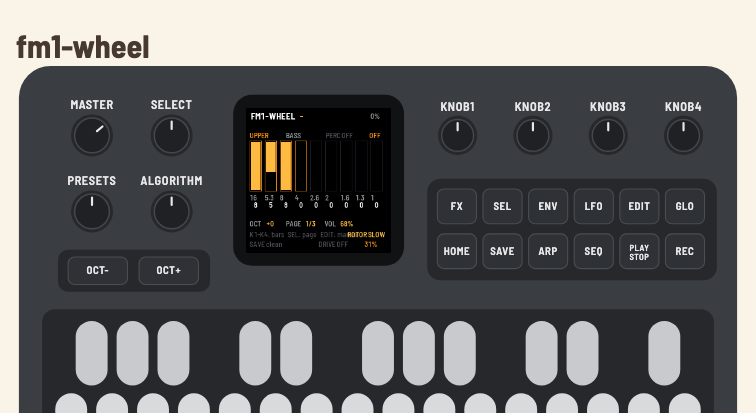
It is not a per-voice organ: it is a shared tonewheel generator, like the original instrument. The timbre comes from the wheels, the contacts, the drawbars and the analogue chain.
Mechanical frequencies (gear ratios), 27 buses, terminal taper and crosstalk, wiring and compartments. The wheels are shared between the keys.
V1–V3/C1–C3 scanner vibrato/chorus, tube preamp, Schroeder reverb and Leslie with Doppler, reflections and acceleration.
Built-in keyboard, USB-MIDI and TRS-MIDI. Drawbar-key mode turns the keys into drawbar controls while an external controller keeps playing.
You can listen now in the browser, or install on the FM-1 when the device is connected.
Connect the FM-1 with a USB data cable and use the web installer in Chrome/Edge. The installer can also restore the official firmware.
The 27 keys play the upper manual. An external MIDI controller can play upper, lower and pedal on channels 1, 2 and 3.
Press GLO: the keys stop playing and push/pull the drawbars. External MIDI keeps sounding.
With the mode on, each flat / natural pair controls one drawbar of the selected manual. The black key pushes in (decreases); the white key pulls out (increases). The bar fills from top to bottom: 8 is fully pulled out, at maximum volume. All 18 control keys light equally; the others stay dark.
GLO toggles the mode. External MIDI keeps playing — the built-in keyboard becomes the registration control.
F3, C4, F4 and C5 are ignored. D#5, E5, F5, F#5 and G5 are free.
| Pair | Drawbar |
|---|---|
| F#3 / G3 | 16' |
| G#3 / A3 | 5⅓' |
| A#3 / B3 | 8' |
| C#4 / D4 | 4' |
| D#4 / E4 | 2⅔' |
| F#4 / G4 | 2' |
| G#4 / A4 | 1⅗' |
| A#4 / B4 | 1⅓' |
| C#5 / D5 | 1' |
The labels printed on the device are the originals; the screen shows the real function.
| Control | Function |
|---|---|
| SELECT | drawbar page: 0–3, 4–7, 8 + percussion |
| ALGO / EDIT | manual: UPPER, LOWER, PEDAL |
| PRESET | eight factory registrations |
| K1–K4 | the four bars on the current page; on page 3, the 1' bar and percussion |
| FX | drive on/off |
| ENV / ARP | percussion on/off; 2nd/3rd harmonic |
| LFO | vibrato/chorus OFF → V1 → C1 → V2 → C2 → V3 → C3 |
| PLAY | rotor STOP → SLOW → FAST |
| SEQ | reverb OFF → 30% → 60% → 100% |
| GLO | drawbar-key mode |
| SAVE | write settings to flash |
| OCT− / OCT+ | transpose the built-in keyboard |
| MASTER | output volume |
The full manual covers the MIDI table, what is saved and troubleshooting: Português · English.
Package 0.2.0, web installer and direct download. Connect with a USB data cable; installing is at your own risk.
fm1-wheel is free software. The code, the DSP port and the documentation are on GitHub.
setBfree (GPL-2.0-or-later) — DSP and algorithms.
fm1-base (MPL-2.0) — platform, host simulator, emulator and installer.
felucca-bsp (MPL-2.0) — AC79 layer, boot and loader.
Felucca (GPL-3.0-only) — firmware/UX reference.
The combined firmware is GPL-3.0-or-later. See LICENSING.md and LICENSES/.
Built with OpenCode and DeepSeek V4.1 Flash, under human direction and review.